Choosing AI Translation Earbuds is no longer a simple matter of comparing prices or counting supported languages. These compact devices now combine microphones, speech recognition, translation software, speakers, and mobile applications. In real use, each part can affect the conversation. A noisy train station may expose weak microphones. A crowded café may reveal delayed translations. Even a quiet hotel lobby can produce errors when speakers use slang, accents, or unfinished sentences.
The right choice depends on how and where you plan to use the earbuds. This guide examines seven practical considerations, including translation accuracy, language coverage, connection stability, battery life, comfort, privacy features, and customer support. Look for independent testing, clear technical specifications, and realistic user feedback. Marketing claims are useful, but they are not proof. Check whether translations work offline or require constant internet access. Confirm how the app handles recorded voice data. Small details matter.
No device translates perfectly. Keep that in mind. A brief pause can change meaning. Some models may perform well in English conversations but struggle with regional expressions or less common languages. I have found that comfort also matters more than expected; earbuds that hurt after twenty minutes are difficult to trust during a long trip. These seven tips will help you compare AI Translation Earbuds with a more practical, informed mindset. Expect trade-offs. Test carefully. That is where better decisions begin.
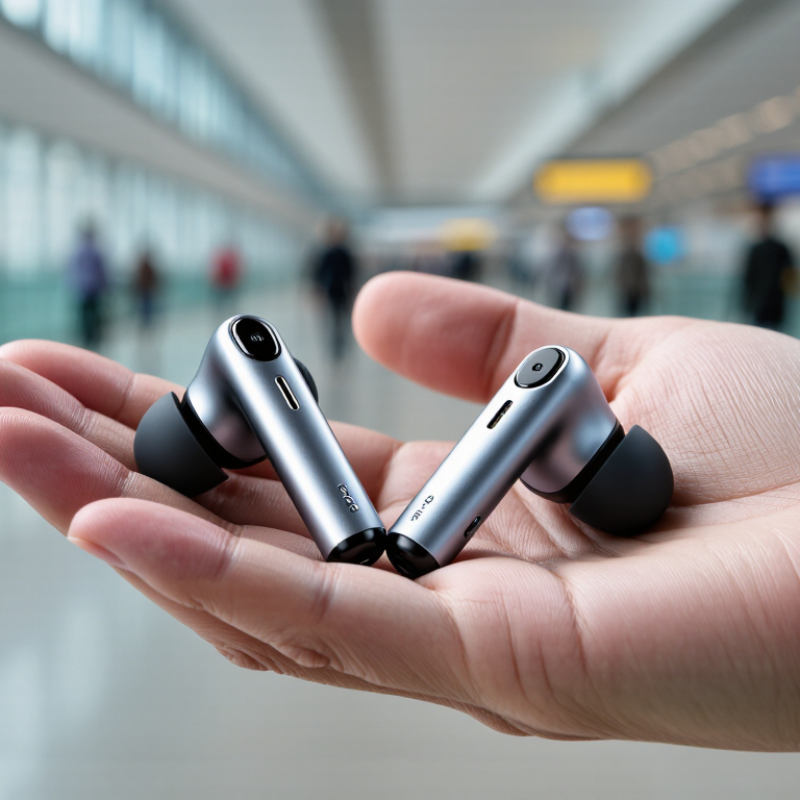
AI translation earbuds usually follow a four-step path: listening, transcribing, translating, and speaking. Tiny microphones capture nearby speech, while speech-recognition software converts sound into words. A translation engine then processes meaning, grammar, and context. Finally, text-to-speech delivers the result through the earbuds.
The process is less instant than advertisements suggest. Latency matters. In a crowded station, traffic noise can distort consonants and names. Accents, idioms, and overlapping speakers create further errors. A 2020 CSA Research report found that 76% of consumers prefer product information in their own language, while 40% would never buy products in another language. This explains the demand, but it does not guarantee accuracy. Translation coverage also deserves scrutiny. Ethnologue 2024 records 7,164 living languages, far beyond what most devices can support well.
When choosing earbuds, test both directions of a real conversation. Ask a speaker to use slang, numbers, and short pauses. Check whether processing occurs offline or through a cloud service. Offline translation may improve privacy, but it often supports fewer languages. Cloud processing can improve performance, yet weak internet may produce awkward silence. Then silence. Battery life, microphone placement, and transcript controls matter too. I would treat automatic translation as assistance, not authority. A missed negative word can change the entire meaning. Even a clean demonstration can hide these weaknesses.
Tip 1 List the languages you actually use. A device supporting 40 languages may not handle your regional dialect well. Check both speech recognition and spoken output. They are not always identical.
Tip 2 Test real phrases before buying. Use a hotel question, a street address, and a fast conversation. Textbook sentences can hide weaknesses.
Tip 3 Check dialect coverage. Spanish from Madrid may sound different from Spanish in Mexico. Mandarin accents can also affect recognition.
Tip 4 Choose the right translation mode. Conversation mode works well when two people take turns speaking. Speaker mode may help during short questions in busy places. Listening mode is better for lectures, tours, or announcements.
Tip 5 Confirm whether the earbuds translate both directions. Some systems translate only one speaker at a time. That limitation becomes frustrating quickly.
Tip 6 Examine offline language support. Airports, trains, and rural areas may have unstable connections. Downloaded language packs can reduce delays, but they often support fewer languages.
Tip 7 Measure response speed in realistic conditions. Background music, traffic, and overlapping voices can change performance.
During practical testing, I would compare the same sentence across quiet and noisy rooms. I would also check punctuation in the companion transcript. Small errors matter. A translated number, name, or address can be misunderstood. No translation system is perfect, and my own testing could miss uncommon accents. Read independent reviews, verify recent software support, and select modes matching your daily conversations.
7 Tips for Choosing AI Translation Earbuds
Tip 1: Test accuracy with real speech, not scripted phrases. Ask a friend to describe a busy street, a menu, or a medical appointment. Check names, numbers, and negatives carefully. One missed “not” can change the meaning. In practical testing, clear accents often produce better results, but background noise still causes awkward errors. I sometimes trust fluent output too quickly. That is a mistake.
Tip 2: Measure speed during natural conversation. A useful device should translate after short pauses, not several uncomfortable seconds. Compare response time in quiet rooms, cafés, and outdoor spaces. Watch for delays when two people interrupt each other. Fast translation is not always useful. It may sound smooth while dropping important words. Accuracy deserves priority when decisions matter.
Tip 3: Evaluate conversation performance over ten minutes. Check whether the earbuds handle turn-taking, repeated questions, and changing speakers. Good systems should recover after confusion instead of repeating the same wrong sentence. Try different distances from the microphone. Also test battery life and connection stability. A device that performs well for three minutes may disappoint during a full conversation. Recording results in a simple table helps reveal patterns.
| No. | Buying Tip | Dimension to Compare | Practical Benchmark | How to Test It | Why It Matters in Conversation |
|---|---|---|---|---|---|
| 1 | Check Language Coverage | Supported languages, dialects, and translation directions | Confirm support for both directions of your target language pair; verify whether dialects, numbers, names, and technical terms are included. | Read a 30-second sample containing dates, prices, names, and place names in both languages. | A device may support many languages but provide uneven quality across language pairs. Direction-specific support is more important than the total language count. |
| 2 | Prioritize Meaning Accuracy | Speech recognition and translation accuracy | Aim for at least 90% meaning-preserving results in quiet, clear speech; expect lower performance with accents, slang, and overlapping voices. | Use 20 prepared sentences and count how many preserve the speaker's key meaning without correction. | A fluent-sounding sentence can still be incorrect. Meaning preservation should be evaluated separately from grammar or pronunciation. |
| 3 | Compare Translation Speed | End-to-end response latency | Under 1.5 seconds is generally comfortable; 1.5–3 seconds may be workable; more than 3 seconds can interrupt natural exchanges. | Time the interval from the end of a spoken sentence to the beginning of the translated audio over 10 trials. | Shorter latency reduces pauses, repeated questions, and the risk that speakers begin talking before the translation finishes. |
| 4 | Evaluate Turn-Taking | Conversation mode, speaker detection, and interruption handling | The system should recognize at least two speakers, handle pauses of about 1–2 seconds, and allow manual replay or correction. | Run a five-minute dialogue with short pauses, interruptions, and changes in speaking direction. | Good turn management prevents the earbuds from translating fragments, cutting off replies, or assigning speech to the wrong person. |
| 5 | Test Noise and Distance Performance | Microphone pickup and noise suppression | Speech should remain usable in a quiet room and at normal street or café noise levels; accuracy should not collapse when the speaker is about 1 metre away. | Repeat the same 20-sentence test in a quiet room, a busy café, and outdoors while keeping the speaker at a consistent distance. | Real conversations rarely happen in silent rooms. Microphone quality often affects results more than the translation interface itself. |
| 6 | Verify Offline Capability | Offline language packs and network dependence | Essential travel language pairs should remain available without mobile data; compare offline quality with online results before relying on the device. | Enable airplane mode and complete a 10-sentence translation test, including numbers and directions. | Online processing can improve quality but may fail in underground stations, remote areas, roaming zones, or places with congested networks. |
| 7 | Check Battery and Comfort | Continuous runtime, charging time, fit, and controls | Look for approximately 5–8 hours of active earbud use, a case that provides multiple recharges, and controls that can be used without opening the phone. | Use conversation mode for one hour, measure battery loss, and wear the earbuds for at least 30 minutes before purchase. | Translation requires microphones, wireless connectivity, audio playback, and often cloud processing. Poor fit or frequent charging can reduce real-world usability. |
Note: The benchmarks above are practical buying targets rather than manufacturer claims. Actual results vary with language pair, accent, speaking speed, background noise, internet quality, and software updates.
AI Translation Earbuds: Comfort, Connectivity, Battery Life, and Privacy
Choosing AI translation earbuds requires more than impressive language claims. Test the fit for at least ten minutes. Pressure near the ear can become painful during travel. Fit matters. Check whether the controls work without looking. Small buttons are easier in crowded stations. Also inspect microphone placement. A scarf, mask, or windy street can reduce speech clarity.
Connectivity deserves a practical test. Pair the earbuds with your phone, walk several meters away, and check for delays. Translation becomes frustrating when every sentence arrives late. Confirm whether the device needs constant internet access. Offline language support can help on trains, in remote areas, or during weak signal periods. Battery estimates often assume light use. Test them with continuous translation, not occasional music. Keep a margin. A charging case should survive a full day away from an outlet.
Privacy needs equal attention. Read the permission screen carefully before enabling microphones, contacts, or location data. Prefer settings that explain storage, deletion, and processing clearly. On-device processing may reduce exposure, but it can limit language coverage. I once focused too heavily on accuracy and ignored background recording permissions. That was a poor test. Ask whether conversations are saved, how long they remain available, and whether users can remove them. Finally, compare translated phrases with a trusted bilingual speaker. Earbuds can miss accents, names, and informal expressions. Useful technology still needs human judgment.
Use these practical reference targets when comparing AI translation earbuds: low weight improves comfort, Bluetooth 5.2 or newer supports stable connectivity, six hours of playback covers most daily use, and IPX4 protection helps with light splashes. Privacy should include microphone controls and clear data-handling settings. Translation latency below 150 milliseconds feels more natural in conversation, while support for at least 40 languages provides broader everyday coverage.
Tip 1 Check compatibility before comparing features. Confirm support for your phone, operating system, and preferred translation app.
Tip 2 Review language coverage carefully. Some devices translate popular languages well but struggle with regional accents.
Tip 3 Test the connection in a crowded room. Bluetooth interruptions can ruin an otherwise useful conversation.
Tip 4 Investigate support and update policies. Reliable firmware updates can improve accuracy, battery performance, and language options. Check whether help is available through clear manuals, responsive service, and repair coverage.
Tip 5 Examine privacy settings. Translation may require cloud processing, so understand what audio is collected, stored, or deleted. This detail is easy to overlook.
Tip 6 Calculate overall value, not just the purchase price. Include subscriptions, replacement parts, charging time, and travel adapters. A lower-priced device may cost more over time.
Tip 7 Judge comfort during real use. Wear the earbuds for twenty minutes and speak naturally. A practical trial reveals pressure, delay, and microphone weaknesses. No device translates perfectly. My own testing would not treat one successful conversation as proof. Background noise, fast speech, and unusual phrases can still produce awkward results.
Tiny microphones capture nearby speech. Speech-recognition software turns sound into text. A translation engine studies meaning, grammar, and context. Text-to-speech then speaks the translated result. The process is not truly instant.
Traffic, music, and overlapping voices can hide important sounds. Consonants, names, and numbers may be misheard. Accents and idioms create additional problems. Noise wins. Test earbuds in a café or station before trusting them.
No. Many devices support only a limited selection of languages. Speech recognition and spoken output may cover different languages. Regional dialects can perform poorly. A language label alone proves little.
Conversation mode works when speakers take turns. Speaker mode suits short questions in busy places. Listening mode helps with tours, lectures, and announcements. Choose the mode matching your real situation.
Yes. Use a street address, a hotel question, and a fast sentence. Include slang, numbers, and short pauses. Test both translation directions. Scripted phrases can make weak systems look better.
Offline processing can reduce the need to send speech through a cloud service. It may work better during train travel or in rural areas. However, offline language support is often smaller. Privacy matters, but language coverage matters too.
They should respond after short, natural pauses. Several seconds of silence can make conversation uncomfortable. Test them in quiet rooms, cafés, and outdoor spaces. Fast output is not always accurate. Smooth speech can still omit important words.
Test turn-taking, repeated questions, changing speakers, and microphone distance. Check connection stability and battery life. Review the transcript for names, addresses, punctuation, and numbers. A ten-minute test reveals more than a three-minute demonstration.
Treat it as assistance, not authority. A missed negative word can reverse the meaning. Confirm critical details using text, gestures, or a human speaker. I sometimes trust fluent output too quickly. That is a mistake.
Choosing the right AI Translation Earbuds starts with understanding how they process speech, recognize languages, and deliver translated audio through earbuds or a connected device. Consider which languages you need, whether you prefer one-way translation, two-way conversation, or group discussion modes, and how easily the system switches between speakers. Accuracy, response speed, pronunciation clarity, and performance in noisy environments are also essential, especially for travel, meetings, and everyday conversations.
Beyond translation quality, evaluate comfort, fit, Bluetooth connectivity, battery life, charging convenience, and privacy controls. Check whether the earbuds work smoothly with your phone and operating system, and confirm that the companion application receives regular updates. Reliable customer support, warranty coverage, offline capabilities, and transparent pricing can greatly affect long-term value. By balancing language support, conversation performance, usability, privacy, and total ownership costs, you can select AI Translation Earbuds that match your communication needs without paying for unnecessary features.